
Design system engine for Figma.
Generate production-ready color systems, brand palettes, effects & design tokens — directly in your design tool.
6 Tools, One Plugin
Everything you need to build and maintain a design system — from color generation to developer handoff.
WCAG Contrast & Spacing
Analyze text contrast ratios against WCAG 2.1 standards and measure spacing between elements.
- AA & AAA level contrast checking
- Auto-fix with lightness adjustment slider
- Spacing measurement between node pairs
- Scan selection or entire page
Brand Color Generator
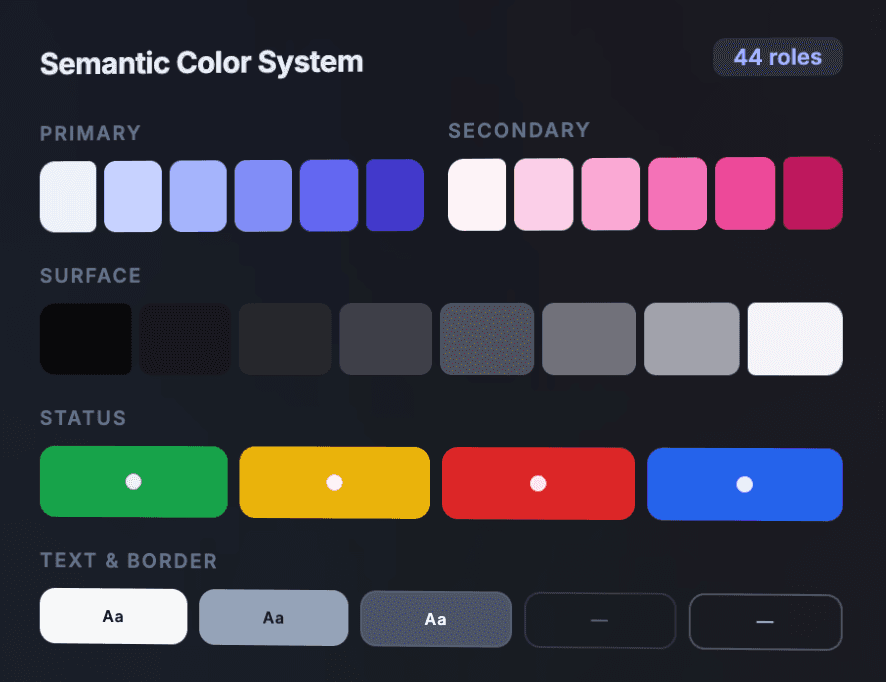
Generate complete color systems from a single hex — 44 semantic roles with tints, shades, and scales.
- Primary, secondary, accent palettes
- Surface, text, border, status roles
- Color harmony (complementary, triadic, etc.)
- Export as Figma variables or CSS
Effects & Presets Library
Apply professional visual effects — shadows, gradients, text effects, glass, borders, and blend modes.
- 12+ shadow presets (Material, iOS, Neon, etc.)
- Linear, radial, conic & mesh gradients
- Text effects: gradient, metallic, 3D, glow
- Glass, border & blend mode presets
Design Lint
Automated design quality checks — catch styling inconsistencies, naming violations, and structural issues.
- Style, naming, structure & cleanup rules
- Error, warning & info severity levels
- Click to focus on problematic nodes
- Category-filtered issue list
Handoff & Export
Prepare design specs for developers — frame dimensions, text specs, CSS generation, and asset export.
- Frame specs (dimensions, layout, position)
- CSS code generation & copy
- Asset export (PNG, SVG, JPG, WebP)
- 1x, 2x, 3x scale options
Asset Library
Browse and apply saved design tokens, brand systems, color palettes, and gradient collections.
- Token browser by collection
- Brand system items
- Saved color & gradient palettes
- Admin management capabilities
44 Semantic Color Roles
Generate a complete color system from a single hex value. Primary, secondary, surface, text, border, status — all mapped to semantic roles with WCAG-compliant contrast ratios.
44 Semantic Color Roles
DTCG formatPrimary
Secondary
Status
How It Works
Login with your Pixeliro account, access your saved palettes, tokens, and UI components — then import directly into Figma.
Login
Sign in with your Pixeliro account inside the plugin. Free tools (WCAG, Colors, Effects, Lint) work without login.
Browse My Assets
Access your saved brand palettes, color systems, design tokens, gradients, and UI Kit components from your workspace.
Import to Figma
One click to import palettes as Figma Variables, UI Kit items as Components, or export handoff specs with CSS.
Ready to streamline your design system?
Install Pixeliro from the Figma Community and start generating production-ready color systems, effects, and tokens in seconds.
Install Pixeliro for Figma